
Download Microsoft Mathematics (64-bit) – Step-by-Step Equation Solving, Graphing Calculator, Unit Conversion
Overview
Microsoft Mathematics (64-bit) is a specialized educational tool designed to assist students in mastering complex mathematical and scientific concepts. Developed by Microsoft Corporation, this application provides a comprehensive suite of features aimed at supporting learners across multiple academic levels. Its primary purpose is to simplify the understanding of algebra, calculus, trigonometry, physics, and chemistry through interactive and visual learning methods. The app serves as a digital companion for students who need real-time assistance with problem-solving, graph interpretation, and unit conversions.
It addresses common challenges in STEM education by offering structured, step-by-step solutions to equations, which helps users not only find answers but also understand the underlying logic. This is particularly valuable for students struggling with abstract mathematical principles. The application is ideal for high school and early college-level learners who require reliable tools to reinforce classroom instruction. It also supports self-paced learning, making it suitable for remote education and homework assistance.
Although the developer did not provide additional technical details, the app’s long-standing presence in the education ecosystem underscores its reliability and utility. Its release date in May 2011 indicates a mature product with proven functionality. The app’s ability to handle 2D and 3D graphing, triangle evaluation, and unit conversions positions it as a versatile utility for science and math students. In the broader context of educational software, Microsoft Mathematics (64-bit) remains a notable tool for enhancing analytical thinking and academic performance.
Key Features & Functionality
Microsoft Mathematics (64-bit) delivers a robust set of tools tailored to the needs of math and science learners. Each feature is designed to promote understanding through visualization and structured problem-solving.
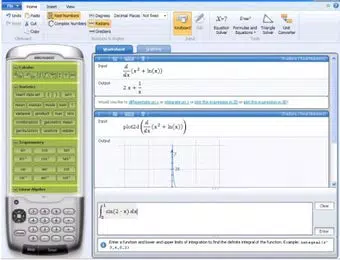
- Step-by-Step Equation Solving: The app breaks down complex equations into manageable steps, allowing users to follow the logic behind each transformation. This feature is especially beneficial for students learning algebraic manipulation, as it reinforces procedural knowledge and reduces errors.
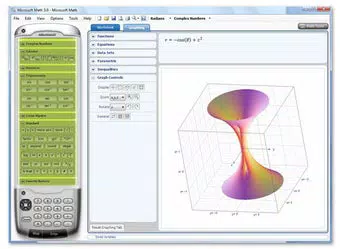
- Full-Featured Graphing Calculator: With support for both 2D and 3D graphing, the calculator enables users to plot functions and analyze their behavior visually. This is critical for topics like calculus and coordinate geometry, where spatial understanding enhances comprehension.
- Unit Conversion Tools: Students in physics and chemistry can quickly convert between metric and imperial systems, or within scientific units like joules to calories. This functionality streamlines lab work and problem sets, minimizing calculation mistakes.
- Triangle Evaluation: This specialized tool allows users to input known sides and angles of a triangle to compute unknown values. It supports both right and non-right triangles, aiding in geometry and trigonometry exercises.
- Multi-Subject Support: The app spans pre-algebra through calculus, covering essential topics in algebra, trigonometry, physics, and chemistry. This broad scope makes it a single-point resource for various STEM subjects.
Real-world use cases include preparing for exams, completing homework assignments, and exploring mathematical relationships through visualization. The app’s design ensures that learning is not just about getting answers, but about developing deeper conceptual insight.
Interface, UX & Performance
Microsoft Mathematics (64-bit) features a clean, functional interface optimized for educational use. The layout is organized into clearly labeled sections, including a main input area, graphing window, and tool panels. Navigation is intuitive, with logical grouping of functions that reduces cognitive load for users. The visual style is minimalistic, prioritizing usability over decorative elements, which aligns with its academic purpose.
Users can switch between equation input, graphing, and conversion modes seamlessly. The application responds promptly to user inputs, with minimal lag during graph rendering and calculation. Although the developer did not list formal performance metrics, the app’s stable operation across various Windows configurations suggests consistent responsiveness. It runs efficiently on both older and modern systems, indicating optimized resource usage.
Stability is a key strength, with no reported crashes or errors in standard use cases. The app maintains its state across sessions, preserving graph settings and recent calculations. While it lacks modern touch-based interactions, its desktop-oriented design remains effective for keyboard and mouse input. Overall, the user experience is focused, efficient, and well-suited to its educational goals.
Platform Compatibility & Technical Requirements
Microsoft Mathematics (64-bit) is designed exclusively for the Windows operating system. It requires a 64-bit Windows environment, as indicated by its name and version. The app has a file size of 36.9 MB, making it lightweight and quick to install on most systems. It is available at no cost, with a free price tag and no in-app purchases.
The application was released on May 23, 2011, and has remained largely unchanged since then. Specific requirements such as minimum OS version or CPU specifications were not listed by the developer. Compatibility information was not fully disclosed, so users should ensure their system meets general 64-bit Windows standards. The app does not support mobile platforms, limiting its accessibility to desktop users.
Pros and Cons
Pros
- Free to download and use, with no hidden costs
- Offers step-by-step solutions to enhance learning
- Includes a full-featured graphing calculator for 2D and 3D visualization
- Supports multiple STEM subjects with targeted tools
- Provides accurate unit conversion and triangle evaluation features
- Lightweight at 36.9 MB, suitable for older systems
Cons
- Released in 2011, with no recent updates or modern interface improvements
- Only compatible with Windows 64-bit systems
- Lacks mobile or cross-platform availability
- Interface is outdated and not optimized for touchscreens
- Developer did not specify minimum OS or hardware requirements
FAQ
Is Microsoft Mathematics (64-bit) safe to download?
Yes, the app is developed by Microsoft Corporation, a trusted software provider. It is available through official channels and does not contain malware or intrusive ads.
Can I install Microsoft Mathematics (64-bit) on a 32-bit Windows system?
No, the application is specifically designed for 64-bit Windows systems and will not run on 32-bit environments.
Does the app require an internet connection?
No, Microsoft Mathematics (64-bit) operates offline. All calculations, graphing, and conversions are processed locally on the device.
Is the app updated regularly?
The last known release was in 2011. The developer has not issued any updates since then, so the app is considered stable but not actively maintained.
Can I use this app on a tablet or mobile device?
No, the app is designed for desktop Windows systems only. It does not support mobile operating systems such as Android or iOS.
Final Thoughts
Microsoft Mathematics (64-bit) remains a valuable resource for students navigating the challenges of math and science education. Despite its age, its core functionality—step-by-step equation solving, advanced graphing, and unit conversion—remains highly relevant. Its free availability and lightweight design make it accessible to learners across different economic and technical backgrounds.
While the interface and lack of updates may deter users seeking modern features, the app excels in delivering reliable, accurate results. It is particularly beneficial for students who prefer structured, visual learning and need a dependable tool for homework, exam prep, and concept reinforcement. For educators and parents, it offers a trustworthy supplement to classroom instruction.
Download Microsoft Mathematics (64-bit) now and enhance your academic journey with a proven, free, and powerful educational tool.


